 Sports Timer
For clubs and trainers
Sports Timer was written for a room full of people who all have to see the same clock, on whatever device happens to be standing at the edge of it.
Where it comes from
In 2013 a judo club in Bruges wanted more science in the training. In practice that meant a different set of intervals almost every session: other work times, other recoveries, other round structures. The timers you could buy did one fixed work-rest pattern and nothing else, so the sessions had to bend to the timer instead of the other way round.
Everything in the app follows from that. It is why blocks can be named, why laps nest, why presets sit one swipe away, and why the digits are the size they are.
One tablet, the whole room
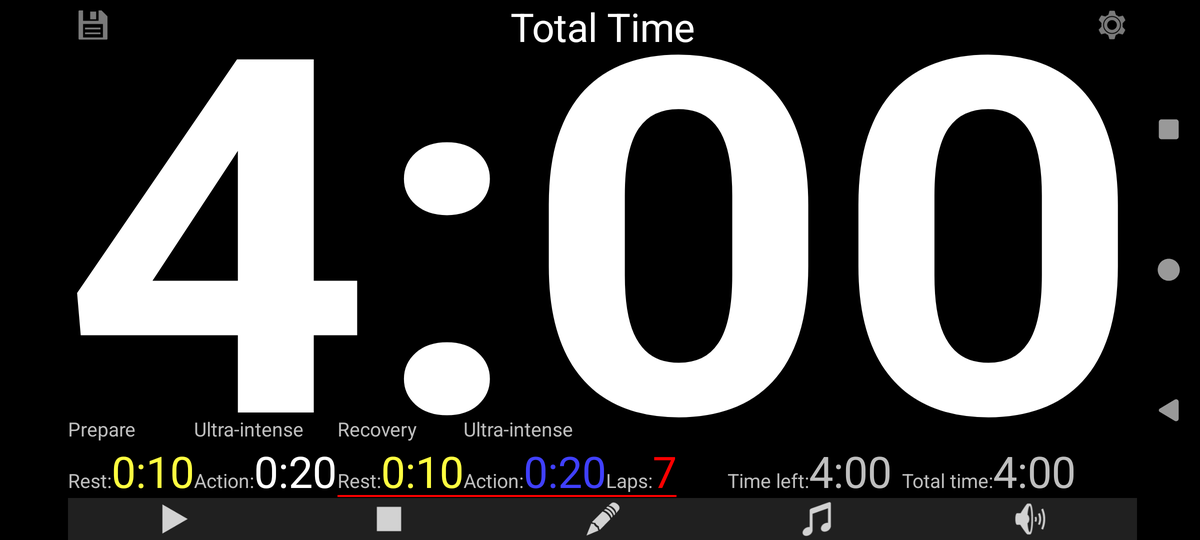
The time fills the screen. On a 10-inch tablet in landscape it is readable from about twenty meters, which covers a dojo, a gym floor or a corner of a sports hall. Rest blocks are a different colour from work blocks, so nobody has to read a word to know whether they should be moving.
The block that is running shows its own name. Put Uchi-komi or Station 3: kettlebell on the screen and you stop shouting the same instruction twelve times.
Sessions that repeat themselves
A programme rarely changes every week. Save the sessions you run often as presets and pull one back with a swipe. Twelve slots means a full block of training can live in the app at once: warm-up, the standard randori structure, the conditioning circuit, the test protocol.
Scheduled start goes one step further. Point it at a presets file, pick a preset, the days of the week and the hour, and the session loads and starts itself. The preset number can also step forward on its own, every run or weekly, so a programme that gets harder over six weeks walks through itself without anybody touching it.
Everyone the same session
Export your presets and mail them to the other trainers. They tap the attachment and have exactly your structures, down to the second. That matters when three groups train the same programme on different evenings, or when someone stands in for you.
Six ready-made sessions are on this site as a starting point, including a six-times-four-minute randori and a circuit of three rounds over six stations.
Practical things for a shared device
| Situation | What helps |
|---|---|
| The club tablet is always at some random volume | The app can set the volume when it opens, so it always starts loud enough for the room. |
| The hall is bright | Brightness can be set at startup too. |
| Nobody should be touching the screen mid-session | The screen is kept awake while a sequence runs, and any tap starts or resumes. |
| Warm-up music from the club playlist | Point the app at a folder of your own music and let it shuffle. |
| A tablet with no SIM and no wifi | Fine. The app has no internet permission and works entirely offline. |
| Members' privacy | Nothing is collected, nothing is sent, no account is needed. See the privacy policy. |
Getting started in a club
-
Install it on the device that will live in the room
An old tablet is ideal. It needs Android 6.0 or newer and nothing else.
-
Import a session to see the shape of it
Take the ready-made workouts and run one, then edit it into your own.
-
Save your real sessions as presets
Name them the way your trainers talk about them, not the way a timer would.
-
Mail the presets to the other trainers
One export, one attachment, and everyone runs the same programme.

Running this in a club and missing something? Say so — the app exists because a trainer asked for it in the first place.